Edit a Lightbox
If you need to make a name change or otherwise update a Lightbox, you can do so by following these steps.
Edit a Lightbox
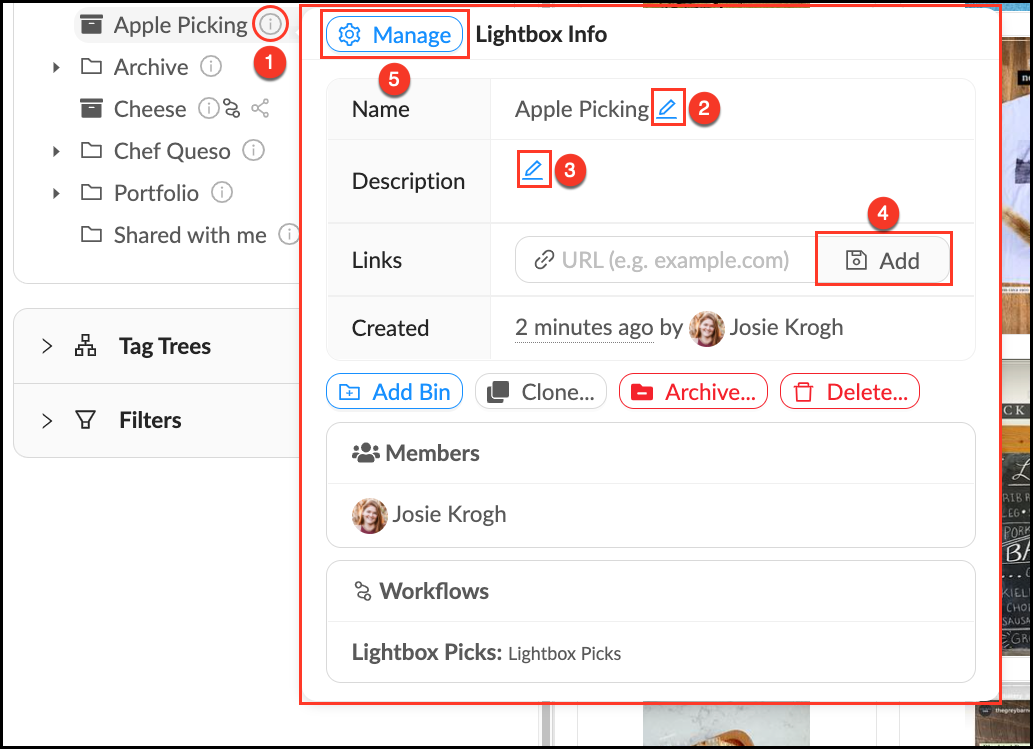
- Mouse over the
 Info pop-over next to the Lightbox you would like to edit. In the Info pop-over you can:
 - Edit a Lightbox name by clicking the
 Blue Pencil next to Name.
 - Edit a Lightbox description by clicking the Blue Pencil next to Description.
- Add a Link to add context or information to a Lightbox.
- Open the
 Management Panel to create a table of contents, share your Lightbox, override permissions and manage member uploads.
 - Changes save automatically.