Edit a Collection

Edit a Collection

If you need to make a name change or otherwise update a Collection, you can do so by following these steps.

Edit a Collection in the Library Panel

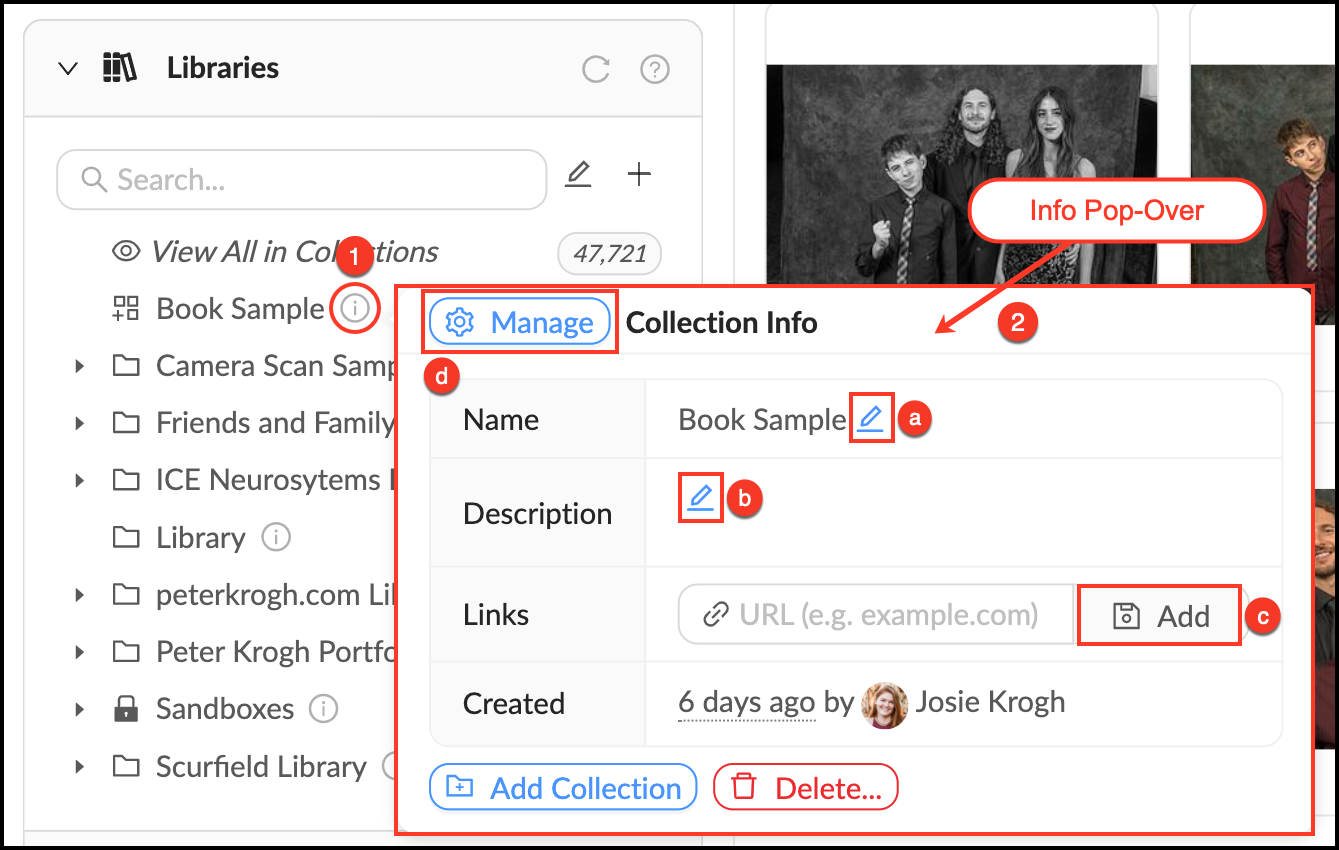
  • Mouse over the Info_Popup.png Info pop-over next to the Collection you would like to edit.
  • In the Info pop-over you can:
    • Edit a Collection’s name by clicking the Blue_Pencil.png blue pencil next to Name.
    • Edit a Collection’s description by clicking the Blue_Pencil.png blue pencil next to Description.
    • Add a link to add context or information to a Collection.
    • Open theManage_Button.png Management Panel to edit permissions or create a Featured Collection.
  • Changes save automatically.

Edit_a_Collection.png


Edit a Collection in the Manage Tab

  • Go to Manage > Collections and click the "Edit" button next to the Collection you would like to edit. 
  • In the manage panel you can:
    • Edit a Collection’s name and description.
    • Apply Group permissions to grant member access.
    • Make it a Featured Collection, which means it will appear on the home page.
    • Add a Table of Contents.
  • Click "Update" to save changes.

    • Related Articles

    • Editing Collection Properties

      4 years ago Updated Follow Not yet followed by anyone You can set and change the values of the editable properties. For such properties, when you hover your mouse pointer to the right of the name, an editing area with the icon appears. If the icon is ...
    • Add Files to a Collection

      A Collection can be expanded or updated by adding more assets at any time. There are multiple ways to add files Collections. Drag and Drop - Simply drag selected files from the workspace onto a Collection to add them. Using the Action menu - ...
    • Set Collection default Sort and View options

      You can set default view options for individual Collections using the Sort and View Options menus. This will be the setting that is first displayed when someone navigates to this Collection. The user can still choose one of the other options, but it ...
    • Creating and Managing Links to a Collection

      4 months ago Updated Follow Not yet followed by anyone A user can share a collection by creating a link to it. All assets included in the collection will be accessible via this link. Access can be granted via a link even to hidden collections. Access ...
    • Set Group permissions in an existing Collection

      Mediagraph enables you to pick which user Groups can see or download your Collections through Permissions. Follow these steps to give members permission to see or download based on their Group membership. Set Member Permissions in an Existing ...