Related Articles
Create a Folder
Folders are the foundation of your storage, they contain files and other folders. Every file in your account lives in a Folder, all assets are uploaded directly into Folders. Follow these steps to make a new Folder. Make a new Folder Mouse over the + ...
Delete a Folder
When a Folder is no longer needed or if you need to start over you can delete it by following these steps. Please note that deleting a Folder cannot be reversed and its contents will be moved to the trash. So make sure that the Folder can be safely ...
Edit an Organizer
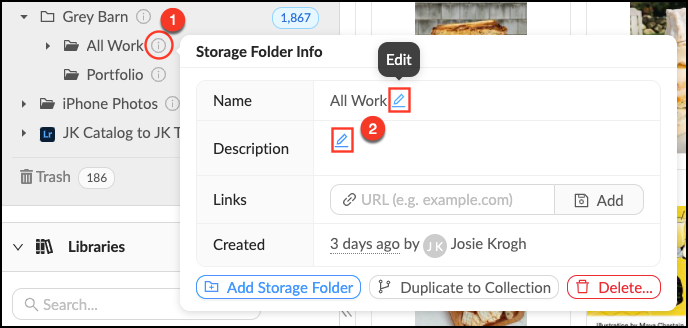
You can change the name, description or add a link to an Organizer at any time. Edit an Organizer Mouse over the Info pop-over next to the Organizer you’d like to edit. Click the next to the field you’d like to edit. Make your changes. Mediagraph ...
Edit a Project
If you need to make a name change or otherwise update a Project, you can do so by following these steps. If you edit a Project's settings, they will NOT automatically be applied to existing Lightboxes within the Project. Changes will only be applied ...
Edit a Lightbox
If you need to make a name change or otherwise update a Lightbox, you can do so by following these steps. Edit a Lightbox Mouse over theInfo pop-over next to the Lightbox you would like to edit. In the Info pop-over you can: Edit a Lightbox name by ...