Edit an Organizer

Edit an Organizer

You can change the name, description or add a link to an Organizer at any time.  

Edit an Organizer

  • Mouse over the info_popup.png Info pop-over next to the Organizer you’d like to edit.
  • Click the blue_pencil.png next to the field you’d like to edit.
  • Make your changes.
  • Mediagraph automatically will automatically save your changes
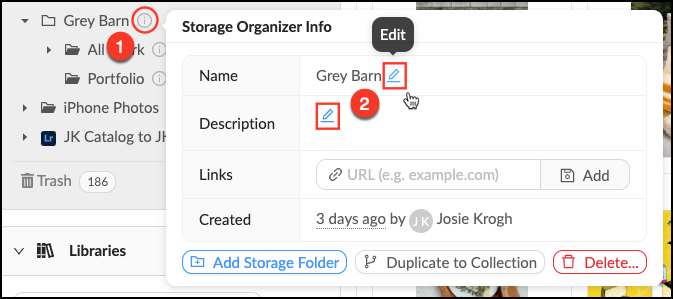
Edit_an_Organizer.png


    • Related Articles

    • Create a Tag Organizer

      Tag Organizers allow you to organize and make visual sense of the tags in your account. This is not a tag that is actually applied to a file, but just a container to hold related tags. You can create as many Tag Organizers as you need. Make a New Tag ...
    • Create an Organizer

      To aid in visual organization, we’ve added Organizers as a way for Administrators or Content Managers to further categorize their top-level view. Assets cannot be uploaded directly into Organizers, they are for visual organization only. Create an ...
    • Create a Lightbox Organizer

      Lightbox Organizers allow you to manage your Lightboxes and Projects just like folders do on your computer. Organizers can hold other organizers, which is helpful once you have created a lot of Lightboxes. You can rearrange these at any time. Note ...
    • Shared Lightbox Organizer

      When someone shares a Lightbox or Project with another Mediagraph member, they will get a notification and the Project will appear in their "Shared with me" Lightbox Organizer. This is where notifications appear. Click the notification icon to mark ...
    • Edit a Folder

      Edit a Folder Mouse over the Info pop-over next to the Folder you’d like to edit. Click the next to the field you’d like to edit. Make desired changes. Mediagraph automatically will automatically save your changes. Source: ...