Create a Library Organizer

Create a Library Organizer

Libraries are created by the account staff to give members a way to browse and discover the content in the account.

Library Organizers are for grouping collections together to further categorize top-level view. Library Organizers do not contain assets, they contain Collections and Collections contain assets. Library Organizers are meant to be used as Collection trees where the same permissions are assigned to the entire tree.

Create a Library Organizer

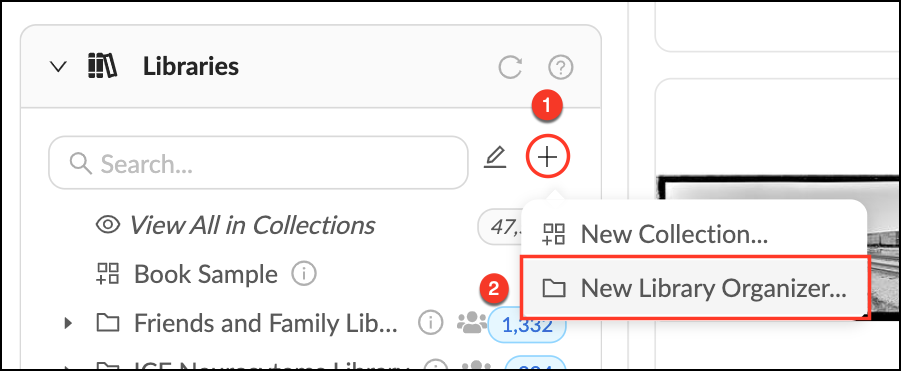
  • Mouse over the + at the top of the Libraries Panel.
  • Select "New Library Organizer" from the dropdown.
  • Give the Library a name and description.
  • Click "Create".

Make_a_Library.png


    • Related Articles

    • What is a Group Library?

      Group Libraries are Library Collections where permissions are linked to Group membership. Group Libraries are an easy way to organize assets and make them accessible to a subset of users. When you first create a Group you have the option to create a ...
    • Create a Group

      Who can use this feature? Admins, Content Managers and Library Managers Available on all plans Groups are the heart of permission control in Mediagraph. They connect members to assets through permissions that are applied to Collections. Groups can ...
    • Create an Organizer

      To aid in visual organization, we’ve added Organizers as a way for Administrators or Content Managers to further categorize their top-level view. Assets cannot be uploaded directly into Organizers, they are for visual organization only. Create an ...
    • Create a Lightbox Organizer

      Lightbox Organizers allow you to manage your Lightboxes and Projects just like folders do on your computer. Organizers can hold other organizers, which is helpful once you have created a lot of Lightboxes. You can rearrange these at any time. Note ...
    • Create a Tag Organizer

      Tag Organizers allow you to organize and make visual sense of the tags in your account. This is not a tag that is actually applied to a file, but just a container to hold related tags. You can create as many Tag Organizers as you need. Make a New Tag ...