Edit a Project

Edit a Project

If you need to make a name change or otherwise update a Project, you can do so by following these steps.

If you edit a Project's settings, they will NOT automatically be applied to existing Lightboxes within the Project. Changes will only be applied to new Lightboxes. To change settings on existing Lightboxes within a Project you will need to individually edit each Lightbox.

Edit a Project

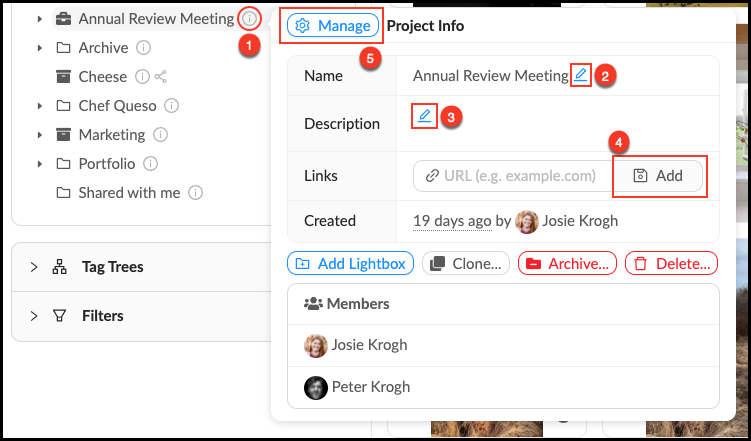
  1. Mouse over theInfo_Popup.pngInfo pop-over next to the Project you would like to edit. In the Info pop-over you can:
  2. Edit a Project name by clicking the Blue_Pencil.pngBlue Pencil next to Name.
  3. Edit a Project description by clicking the Blue_Pencil.png Blue Pencil next to Description.
  4. Add a Link to add context or information to a Project.
  5. Open the Manage_Button.pngManagement Panel to create a table of contentsadd members to your project, override permissions and manage member uploads.
  6. Changes save automatically.


Edit_a_Project.png

    • Related Articles

    • Edit a Folder

      Edit a Folder Mouse over the Info pop-over next to the Folder you’d like to edit. Click the next to the field you’d like to edit. Make desired changes. Mediagraph automatically will automatically save your changes. Source: ...
    • Edit an Organizer

      You can change the name, description or add a link to an Organizer at any time. Edit an Organizer Mouse over the Info pop-over next to the Organizer you’d like to edit. Click the next to the field you’d like to edit. Make your changes. Mediagraph ...
    • Edit a Lightbox

      If you need to make a name change or otherwise update a Lightbox, you can do so by following these steps. Edit a Lightbox Mouse over theInfo pop-over next to the Lightbox you would like to edit. In the Info pop-over you can: Edit a Lightbox name by ...
    • Clone a Project

      Cloning a Project allows you to make a new copy of an existing Project. You can leave the original version (and any existing connections to it) intact while making changes to the permissions, organizational structure, number of assets, or workflows ...
    • Create a Project

      Projects are for storing and managing multiple related Lightboxes. By default, Lightboxes created inside of a Project inherit all the settings from the Project, you can override parent settings if you wish. Projects are most useful for work that ...