Rearrange Folders

Rearrange Folders

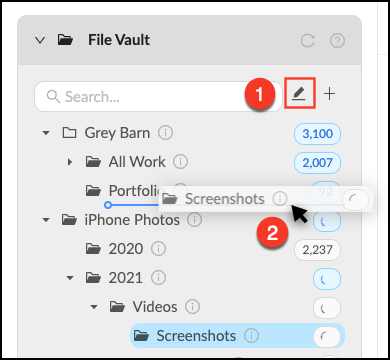
You can move Folders and Organizers around by entering Rearrange Mode in the File Vault. 

Rearrange Folders
  • Click theRearrange_Mode.pngpencil next to the search bar to enter Rearrange Mode.
  • Select the Folder or Organizer you’d like to move and drag it where you’d like it to live. A blue line will appear to show you where you are moving the item.
  • Exit Rearrange Mode by clicking the Rearrange_Mode_-_Shaded.pngpencil when finished

Rearrange_Folders.png


Tip: Changes may take a minute to populate. Hit the refresh button to see the changes you made immediately.

    • Related Articles

    • How to Rearrange Tags in the Tag Tree

      You want to organize the Tag Tree in a way that makes sense for your assets and members. The goal is to and highlight people, things or events that are important to your organization. When you add a Tag to the Tag Tree it will often appear as a ...
    • File Vault Overview

      The File Vault is where you manage the storage of assets for the account. This is typically the best place for an Administrator or Content Manager to upload files into the account. Only Content Managers and Administrators can see the Folders Panel. ...
    • Create a Lightbox Organizer

      Lightbox Organizers allow you to manage your Lightboxes and Projects just like folders do on your computer. Organizers can hold other organizers, which is helpful once you have created a lot of Lightboxes. You can rearrange these at any time. Note ...
    • Shared Lightbox Organizer

      When someone shares a Lightbox or Project with another Mediagraph member, they will get a notification and the Project will appear in their "Shared with me" Lightbox Organizer. This is where notifications appear. Click the notification icon to mark ...
    • Archive a Lightbox

      You can archive a Lightbox, Project or Lightbox Organizer when it is completed or inactive to reduce clutter in the Projects Panel. The Archive button will move the Lightbox into the "Archive" Lightbox Organizer, but won’t delete any content or ...