Archive a Lightbox

Archive a Lightbox

You can archive a Lightbox, Project or Lightbox Organizer when it is completed or inactive to reduce clutter in the Projects Panel. The Archive button will move the Lightbox into the "Archive" Lightbox Organizer, but won’t delete any content or remove any members.

Tip: You can always move a Lightbox out of the Archive by entering rearrange mode and dragging it back into the main panel.

Archive a Lightbox

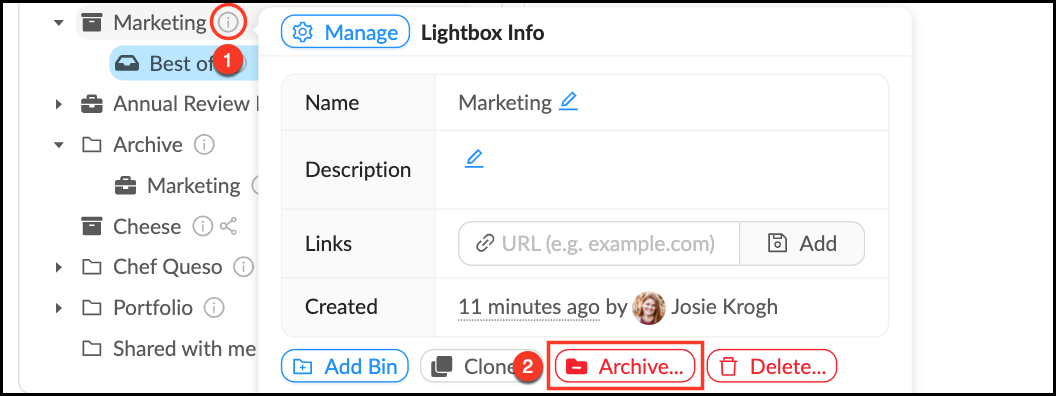
  1. Mouse over the Info_Popup.pngInfo pop-over next to the Lightbox you would like to archive.
  2. Click Archive.
  3. Click OK.
  4. Your Lightbox will now live in the Archive Organizer.
Archive_a_Lightbox.png


    • Related Articles

    • Delete a Lightbox

      When a Lightbox is no longer needed or if you need to start over, you may want to delete it. All members can delete Lightboxes they own, but no one can delete a Lightbox they have been invited to. Deleting a Lightbox will NOT delete the assets in ...
    • Create a Lightbox

      A Lightbox is a personal tool that allows users to organize Mediagraph content based on their own project needs. The person who makes the Lightbox is the “owner” and controls the settings. They can add files to their Lightbox, invite other members to ...
    • Edit a Lightbox

      If you need to make a name change or otherwise update a Lightbox, you can do so by following these steps. Edit a Lightbox Mouse over theInfo pop-over next to the Lightbox you would like to edit. In the Info pop-over you can: Edit a Lightbox name by ...
    • Create a Lightbox Organizer

      Lightbox Organizers allow you to manage your Lightboxes and Projects just like folders do on your computer. Organizers can hold other organizers, which is helpful once you have created a lot of Lightboxes. You can rearrange these at any time. Note ...
    • Clone a Lightbox

      Cloning a Lightbox allows you to make a new copy of an existing Lightbox. You can leave the original version (and any existing connections to it) intact while making changes to the permissions, organizational structure, number of assets, or workflows ...