Sandbox Collections

Sandbox Collections

When you make a Group you have the option of creating a Group Sandbox.  Sandboxes are Collections that can only be accessed by Managers and Taggers. Sandbox Collections are useful for the preparation of files for inclusion in “regular” member-facing collections. This can include selection, removal, tagging and organizing into new Collection trees. 

Sandboxes are also a helpful tool to manage member uploads. If you choose to enable Group Member Contributions, you can automatically add all member uploads to a Sandbox where they can be reviewed by a Library Manager.
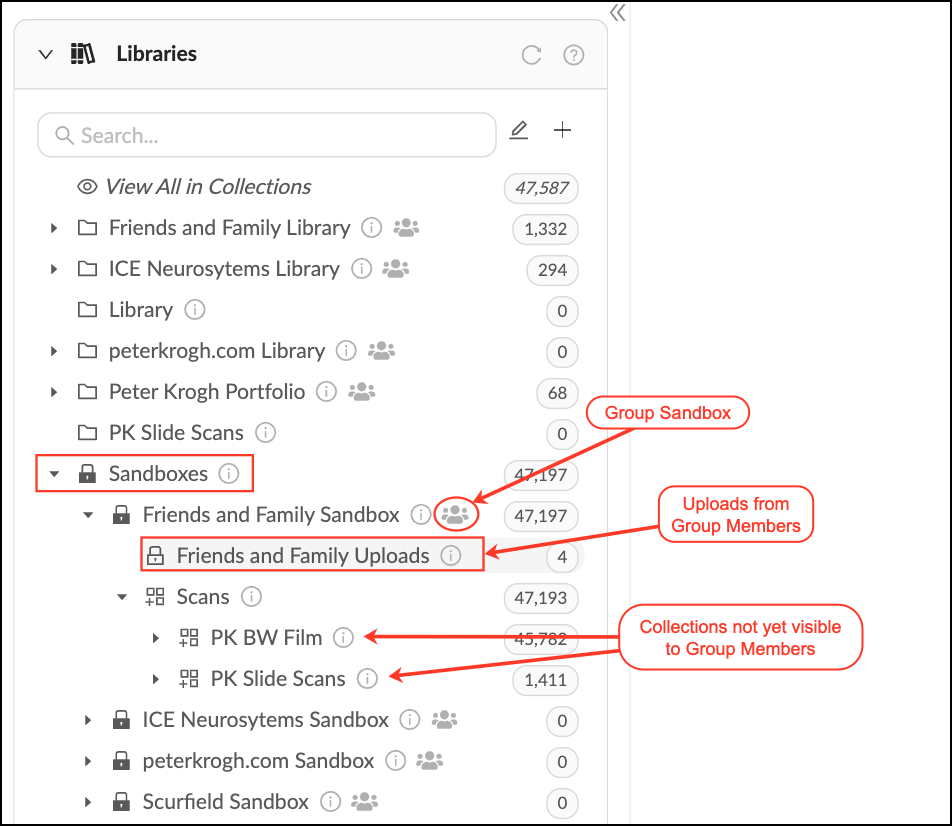
 

Sandbox_Overview.png


You can move a Sandbox Collection into a regular Library to make it accessible to general Members. Moving the Sandbox will change its permissions to match the permissions in the destination Library. 

  • Groups can have their own sandboxes which are invisible to managers of other groups.
  • Group Sandboxes are visible to Global Library and Content Managers.

    • Related Articles

    • Sandbox Collections

      Who can use this feature? Admins, Content Managers, Library Managers and Taggers can see Sandboxes. Available on all plans When you make a Group you have the option of creating a Group Sandbox. Sandboxes are Collections that can only be accessed by ...
    • Using Auto-add to Collections

      The auto-add feature allows you to automatically add files to a collection from a designated Folder, Collection or Lightbox. This is useful for making files accessible to different groups automatically. Auto-add for Group Uploads The auto-add feature ...
    • Creating Collections

      2 years ago Updated Follow Not yet followed by anyone To create a collection: Select one or more assets in the asset feed. Open the left sidebar and click on "Create collection". Type the name of the collection and press Enter. You can create several ...
    • Rearrange Collections

      Rearranging Collections is an easy way to add or remove Collections from Collection Trees. When you move a Collection into a new Library Organizer or Parent Collection, the Collection will automatically inherit the permissions of the parent ...
    • Deleting Collections

      2 years ago Updated Follow Not yet followed by anyone To delete a collection, do the following: Select one or more collections from the collection feed. At the bottom of the screen, you will see the bulk actions panel. Press Delete. Once a collection ...