Remove assets from a Lightbox

Remove assets from a Lightbox

Only the owner of a Lightbox can remove assets from it. Members who have been invited to join a Lightbox can add assets, but not remove them.

Removing an asset from a Lightbox will not delete it from the account. If you remove an asset from a Lightbox that was uploaded directly to the Lightbox, it will still live in the File Vault in a folder named for the person who originally uploaded the file.

Remove Assets from a Lightbox

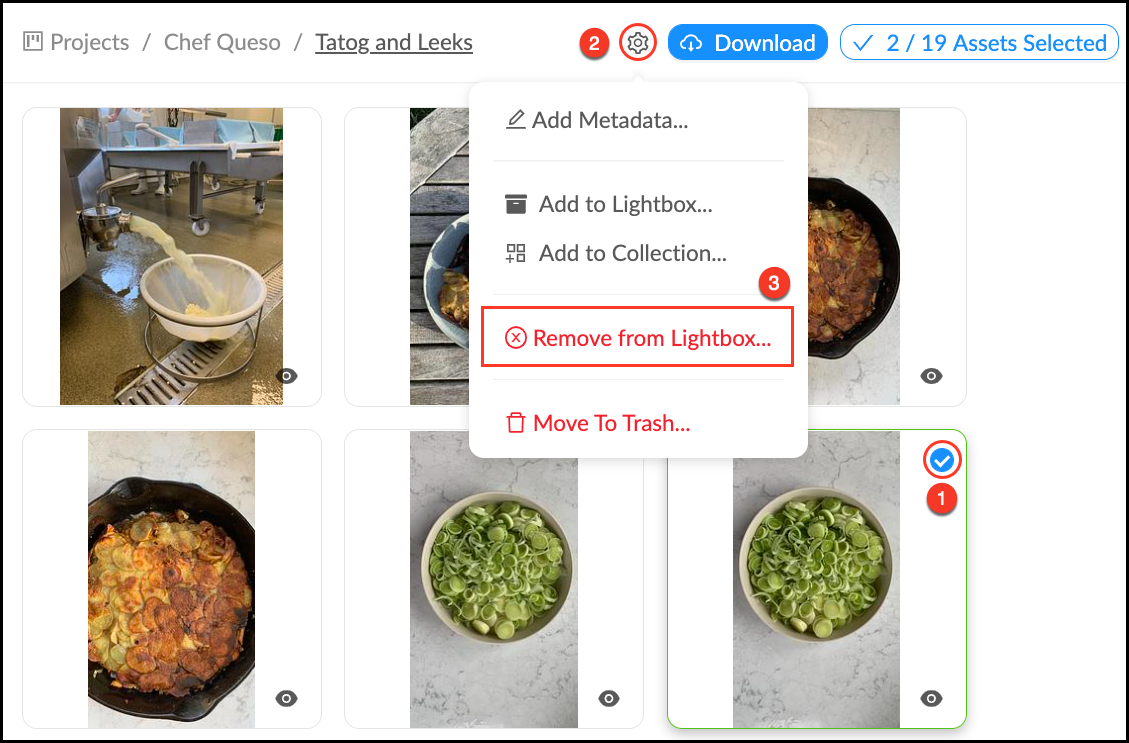
  1. Go to the Lightbox and select the all assets you would like to remove by clicking on them. You will see the check mark that indicates an asset has been selected, and the asset selection counter will tell you how many you have selected.
  2. Mouse over the Settings_Wheel.pngAction Menu.
  3. Click Remove from Lightbox…
  4. Click OK.

Remove_from_Lightbox.png

    • Related Articles

    • Add Assets to a Lightbox

      This article will explain how to add files from the Mediagraph Library to your Lightbox, click here to learn how to upload your own files directly to a Lightbox. Note: If you add an asset to a Bin, it will be added automatically to the Lightbox that ...
    • Create a Lightbox Share Link

      Share links allow you to share files with other people, without requiring them to create an identity or log in. This removes a lot of friction from the sharing process, but it also means you don’t know who has accessed the files. Share links can only ...
    • Archive a Lightbox

      You can archive a Lightbox, Project or Lightbox Organizer when it is completed or inactive to reduce clutter in the Projects Panel. The Archive button will move the Lightbox into the "Archive" Lightbox Organizer, but won’t delete any content or ...
    • Delete a Lightbox

      When a Lightbox is no longer needed or if you need to start over, you may want to delete it. All members can delete Lightboxes they own, but no one can delete a Lightbox they have been invited to. Deleting a Lightbox will NOT delete the assets in ...
    • Clone a Lightbox

      Cloning a Lightbox allows you to make a new copy of an existing Lightbox. You can leave the original version (and any existing connections to it) intact while making changes to the permissions, organizational structure, number of assets, or workflows ...