How do I make a Collection visible to the public?

How do I make a Collection visible to the public?

Public Collections are visible to anyone who visits your domain without logging in, including non-members. This feature is typically used to show off promotional or press-related assets.

Make a Collection Public

Follow these steps to make an existing Collection public:

  • Locate the Collection and mouse over the Info_Popup.png Info pop-over next to its name.
  • Click theManage_Button.pngbutton to enter the Collection Management Panel.
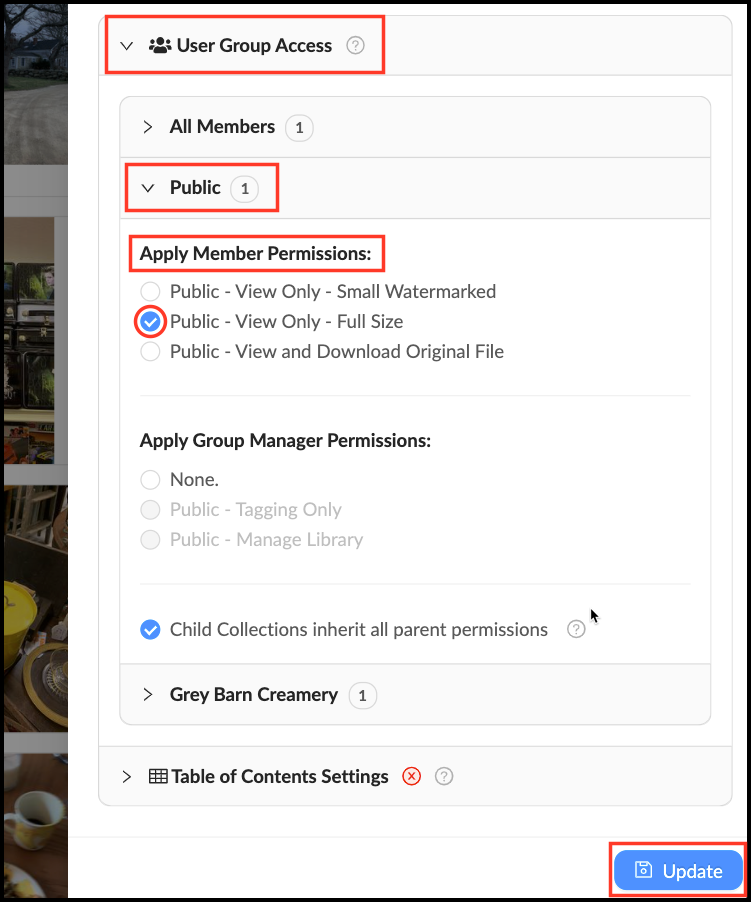
  • Click the tab labeled "User Group Access".
  • Click the tab labeled "Public".
  • Click the checkbox next to desired Public permission level to grant view or download access (it is generally safer not to grant public download permissions).
  • Click "Update" to save changes.

Make_a_Collection_Public.png


Pro-Tip: Go to Group Settings to change the Permissions options for the Public.


    • Related Articles

    • Collection Properties

      3 years ago Updated Follow Not yet followed by anyone Just like assets, collections have a set of properties. You can add a title, description, tags, and other information that will help you quickly find the necessary collections in the feed. To view ...
    • Make a Featured Collection

      Featured Collections are displayed on the Front Page. They are a great way to direct users to the most relevant, important or frequently-used collections of assets. You can feature a single Collection, or an entire Library. To create a featured ...
    • Enable public uploads

      By default, only the Members you give upload permissions to can upload files to your Mediagraph account. If you want to enable uploads for the general public, you can easily enable a Public Contribution Request upload pipeline. This adds a blue ...
    • All Members and Public Groups

      All accounts come populated with two “automatic” groups: All Members and Public. These are useful for providing a general access to material. Use the All Member Group to give everyone in your Mediagraph organization access to certain assets. Give ...
    • How do I make a Library accessible to all members?

      If you want to make certain assets available to your entire Mediagraph organization we recommend doing this through applying All Member Group permissions to a central Library or Collection Tree. To make this easy, your Mediagraph account comes with ...