How do I clear my site data for Mediagraph only?
Mediagraph Troubleshooting:
How do I clear my site data?
How do I reset my site data?
Sometimes Mediagraph needs a clean slate. Here are browser-specific instructions on how to select and clear site data for Mediagraph only:
Chrome
- At the top right of the browser window, click the vertical ellipsis
and select Settings from the dropdown menu.
- On the left navigation menu, click
Privacy and security.
- Select
Cookies and other site data.
- Scroll down and click See all site data and permissions.
- At the top right, search for 'mediagraph.'
- To the right of the site, click the
.
- To confirm, click the blue Clear button:
Edge
- Select Settings and more ... > Settings > Cookies and site permissions.
Under Cookies and data stored, select Manage and delete cookies and site data > See all cookies and site data and search for 'mediagraph.'
Select the down arrow to the right of 'mediagraph' and select Delete.
Firefox
- In the Menu bar at the top of the screen, click and select .
- Select the panel and go to the Cookies and Site Data section.
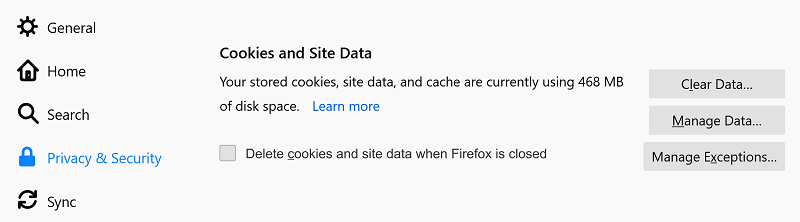
- Click the button. The Manage Cookies and Site Data dialog will appear.
- In the Search websites field, type 'mediagraph.'
- .
- Click .
- In the Removing Cookies and Site Data confirmation dialog that opens, click .
 Safari
In the Menu bar, choose Safari > Settings, then click Privacy.
Click Manage Website Data.
Select 'mediagraph', then click Remove.