File Naming for Lightroom Uploads

File Naming for Lightroom Uploads

You can use Lightroom’s file naming tools in the Publish Service. This will rename files as you upload to MediaGraph. In general, it’s best to not rename, so that the files in Lightroom will have the same names on MediaGraph.

Add Copy name if you use Virtual Copies

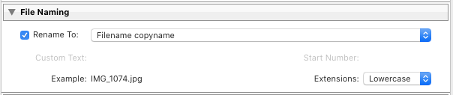
If Virtual Copies are a part of your workflow, you can add the copy name automatically to the filename, whenever a copy is uploaded. (Files that are not virtual copies will just have the filename.)
File_Name2.png

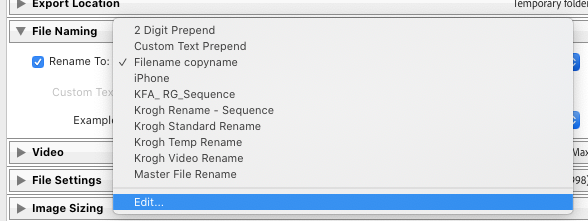
Open the File Template Editor and make a new preset that includes File Name and Copy Name. 
 

Screen_Shot_2021-12-16_at_11.04.31_AM.pngScreen_Shot_2021-12-16_at_11.03.54_AM.png


    • Related Articles

    • File Type Recommendations for Lightroom Upload

      For general access In most cases a full-size-full-quality sRGB JPEG will be the right file to upload. A well-prepared JPEG file is fine for most reproduction purposes, either in print or on the web. High-quality JPEGs and visually indistinguishable ...
    • Lightroom Publish Configurations

      Lightroom Publish Configurations Mediagraph Support Updated 3 years ago Follow Not yet followed by anyone Who can use this feature? Admins and Content Managers Available on all plans Here are some of the options and restrictions we’ve put on the ...
    • Allow Lightbox Uploads

      As an admin, by default you can enable uploads in Lightboxes you create. In order to allow non-admin Mediagraph members to enable uploads into their Lightboxes, you must change your default site settings. When a user uploads assets to a Lightbox, the ...
    • Connecting Mediagraph and Lightroom Classic

      The Lightroom Publish Plugin allows for external services like Mediagraph to seamlessly integrate with Lightroom Classic. Follow these steps to set up the connection. Note: Although the Plugin should work with a number of older versions of Lightroom, ...
    • Enable public uploads

      By default, only the Members you give upload permissions to can upload files to your Mediagraph account. If you want to enable uploads for the general public, you can easily enable a Public Contribution Request upload pipeline. This adds a blue ...