Delete a Folder

Delete a Folder

When a Folder is no longer needed or if you need to start over you can delete it by following these steps. Please note that deleting a Folder cannot be reversed and its contents will be moved to the trash. So make sure that the Folder can be safely deleted before proceeding. 

Pro Tip: Deleting a parent Folder will erase all subfolders inside. If you wish to keep some or all of your subfolders be sure to drag them into a new parent Folder before you start deleting. 

Delete a Folder

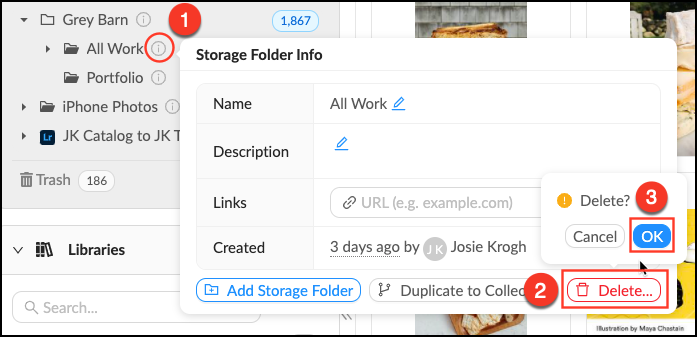
  • Mouse over the info_popup.png Info pop-over next to the Folder you want to delete.
  • Click Delete.
  • Click OKAll contents will be moved to the trash.
Delete_Folder.png


    • Related Articles

    • Delete a Lightbox

      When a Lightbox is no longer needed or if you need to start over, you may want to delete it. All members can delete Lightboxes they own, but no one can delete a Lightbox they have been invited to. Deleting a Lightbox will NOT delete the assets in ...
    • Create a Folder

      Folders are the foundation of your storage, they contain files and other folders. Every file in your account lives in a Folder, all assets are uploaded directly into Folders. Follow these steps to make a new Folder. Make a new Folder Mouse over the + ...
    • Edit a Folder

      Edit a Folder Mouse over the Info pop-over next to the Folder you’d like to edit. Click the next to the field you’d like to edit. Make desired changes. Mediagraph automatically will automatically save your changes. Source: ...
    • Duplicate a Folder to Collections

      Who can use this feature? Admins and Content Managers Available on all plans All account assets are uploaded into Folders in the File Vault where they are organized and prepared for distribution by Admins and Content Managers. The quickest way to ...
    • Delete an Asset

      Assets can be moved to the Trash once they are no longer needed. Admins and Global Content Managers always have the ability to move assets to the Trash. There are numerous safeguards in place to protect against accidental deletion. Assets will ...