Create a Collection

Create a Collection

Collections are the primary way to make assets available to account members. Collections provide a natural way to navigate through a set of files, much like folders on your computer. To create a Collection follow the instructions below.

A file can be in as many Collections as you want without making duplicate files. This is because the Collections contain a digital copy of the file stored in the File Vault.

Create a Collection

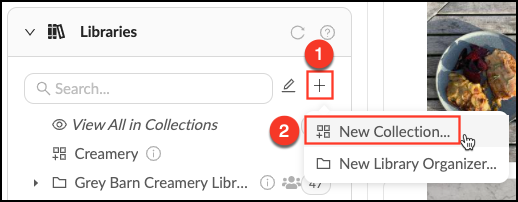
  • Mouse over the + next to the search bar in the Libraries Panel.
  • Click "New Collection…"
  • Give your new Collection a name and description (optional).
  • Click "Create".

Create_Collection.png


    • Related Articles

    • Create a Sub-Collection

      Sub-Collections help you create useful divisions within a parent Collection. You can make as many sub-Collections as necessary to ensure that your assets are well-organized. Important: All child Collections will inherit the permissions of the parent ...
    • Create a Library Organizer

      Libraries are created by the account staff to give members a way to browse and discover the content in the account. Library Organizers are for grouping collections together to further categorize top-level view. Library Organizers do not contain ...
    • Create a Group

      Who can use this feature? Admins, Content Managers and Library Managers Available on all plans Groups are the heart of permission control in Mediagraph. They connect members to assets through permissions that are applied to Collections. Groups can ...
    • Collection Properties

      3 years ago Updated Follow Not yet followed by anyone Just like assets, collections have a set of properties. You can add a title, description, tags, and other information that will help you quickly find the necessary collections in the feed. To view ...
    • Building Collection Trees

      Collection trees create a logical and easy-to-navigate structure for your content. A Collection Tree starts with a top-level container (either a Collection or Library Organizer) and then is made up of sub-Collections that contain assets. By default ...