Create a Bin

Create a Bin

A Bin is like a folder within a Lightbox. Bins are helpful for grouping assets within a LightboxA file can be in only one Bin per Lightbox. This means they're useful for organizing material with no overlap (e.g. everything belongs to one and only one bin.)

Create a Bin

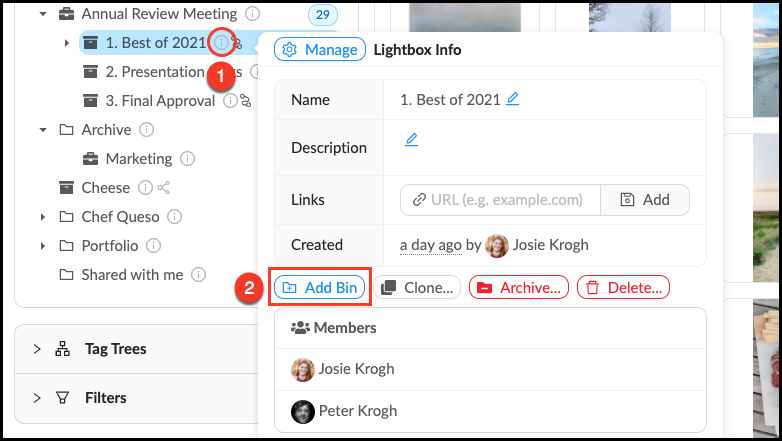
It is only possible to make a Bin from within a Lightbox's info pop-over. Follow these steps to create a new Bin.

  1. Mouse over the Info_Popup.pngInfo pop-over next to the desired parent Lightbox.
  2. Click + Add Bin in the Info pop-over.
  3. Give your Bin a name and description (optional).
  4. Click OK.

Make_a_Bin.png

You cannot move a Bin out of its Lightbox, if you would like to move a Bin to another Lightbox you must clone it.


    • Related Articles

    • Clone a Bin

      Cloning a Bin allows you to make a new copy of an existing Bin. You can leave the original version (and any existing connections to it) intact while making changes to the permissions, organizational structure, number of assets, or workflows of the ...
    • Create an Organizer

      To aid in visual organization, we’ve added Organizers as a way for Administrators or Content Managers to further categorize their top-level view. Assets cannot be uploaded directly into Organizers, they are for visual organization only. Create an ...
    • Create a Lightbox Organizer

      Lightbox Organizers allow you to manage your Lightboxes and Projects just like folders do on your computer. Organizers can hold other organizers, which is helpful once you have created a lot of Lightboxes. You can rearrange these at any time. Note ...
    • Create a Tag Organizer

      Tag Organizers allow you to organize and make visual sense of the tags in your account. This is not a tag that is actually applied to a file, but just a container to hold related tags. You can create as many Tag Organizers as you need. Make a New Tag ...
    • Create a Folder

      Folders are the foundation of your storage, they contain files and other folders. Every file in your account lives in a Folder, all assets are uploaded directly into Folders. Follow these steps to make a new Folder. Make a new Folder Mouse over the + ...