Add a Group Library Manager
Group Library Managers allow a Group’s content and members to be managed by someone who does not have full control over the entire account. Group managers allow you to share the burden of management of the account as other departments, stakeholder groups or other sets of members are brought onboard.
Group Library Manager permissions
Add Group Library Managers
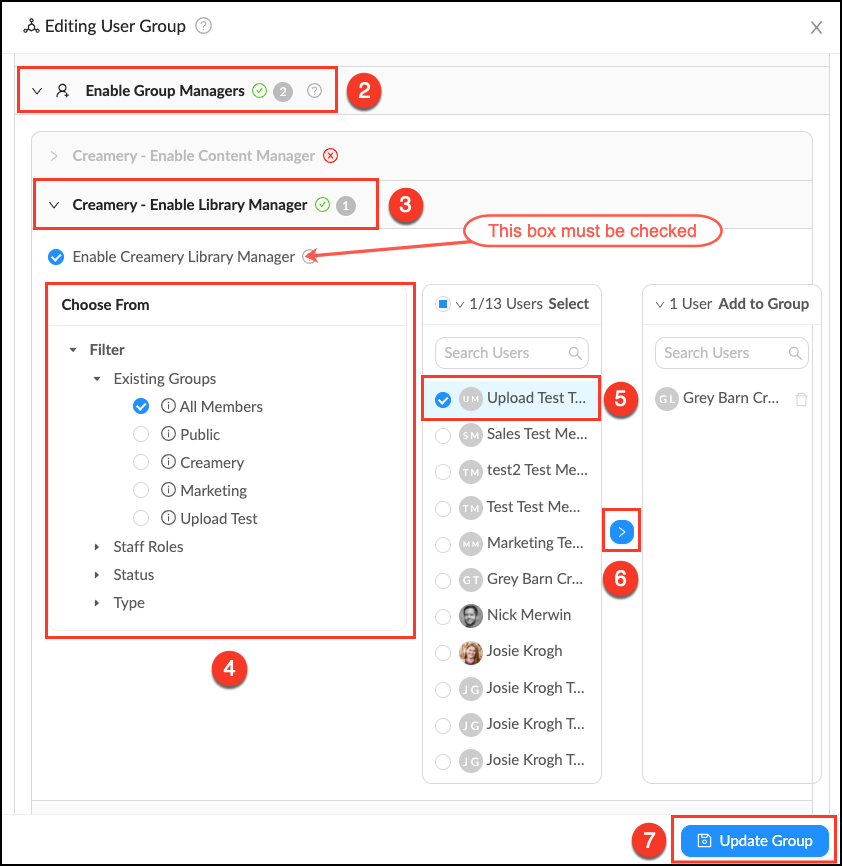
- Go to Manage > Groups and click Edit next to the desired Group.
- Click the accordion labeled Enable Group Managers.
- Click the accordion labeled Group Name - Enable Library Manager. Make sure the box is checked to Enable Group Library Managers.
- Use the filters to narrow displayed users to select from.
- Select members you would like to make Library Managers.
- Click the
blue arrow to add these Group Managers. - Click Update Group to save changes.
Related Articles
What is a Group Library?
Group Libraries are Library Collections where permissions are linked to Group membership. Group Libraries are an easy way to organize assets and make them accessible to a subset of users. When you first create a Group you have the option to create a ...
Create a Group
Who can use this feature? Admins, Content Managers and Library Managers Available on all plans Groups are the heart of permission control in Mediagraph. They connect members to assets through permissions that are applied to Collections. Groups can ...
Group roles overview
In addition to global roles Mediagraph also supports group based roles for members and staff. This allows the group’s content and members to be managed by someone who does not have full control over the entire account. Group roles include: Group ...
Mediagraph permissions by Group role
Group managers allow you to share the burden of management of the account as other departments, stakeholder groups or other sets of members are brought onboard. This chart breaks down permission by Group role. Enabled by default Can be enabled by a ...
Add a Group Tagger
Group Taggers allow you to share the burden of tagging assets without giving a user full control of a Group's assets. They can create and assign tags to assets in the Group Library and Sandbox. Group Taggers permissions View the Group Library and ...